coorda tools – User guide
1. Introduction – Welcome to coorda tools
coorda tools are your tools for every day: appointments and tasks, shopping list and supplies, recipes, trips, contracts, calculator, translator, weather and much more – all in one place, in the browser, on phone, tablet and computer. There is nothing to install. If you like, add coorda tools to your home screen and open them like an app.
The idea: cabinets with drawers
Many small everyday apps know nothing about each other. coorda tools are different. Everything is arranged like a well-organised home: there are cabinets for the big areas of life, and in every cabinet drawers for the individual things. The “Household” cabinet, for example, holds Inventory, Shopping list, Belongings and Wish list.
The drawers work together:
- A recipe puts the missing ingredients on the shopping list with one tap.
- Whatever runs low in the inventory goes onto the shopping list.
- A wish that has been bought moves into Belongings, warranty included.
- Birthdays come by themselves from Family and Contacts.
- “Today” collects everything that is due – from all drawers.
The 9 cabinets at a glance
| Cabinet | What’s inside |
|---|---|
| 📅 Planner | Today, Appointments, Tasks, Birthdays, Notes |
| 👥 Personal | Contacts, Family, Gift ideas, Pets |
| 🏠 Household | Inventory, Shopping list, Belongings, Wish list |
| 🍳 Kitchen & Garden | Recipes, Garden, Plant list |
| 🚗 Vehicles | My vehicles, Service & dates |
| ✈️ Leisure & Travel | Trips, Destinations, Packing list, Tickets |
| 🧰 Useful | Calculator, Converter, Translator, My location, Files, Contracts |
| 🛟 Everyday helpers | Clock, Voice recorder, Video, Scanner, Light & magnifier, Compass & more |
| 🔐 Encrypted | Vault, Budget book, Medication, ID documents, Directives |
On top of that there is the weather, with severe-weather warnings and weather reports from people on the spot.
What makes coorda tools special
- Sharing per drawer: the shopping list with your partner, the wish list with the family – the other person only sees that one drawer, nothing else.
- One account for everything: with your coorda account you use coorda tools and all other coorda services.
- From Europe: developed in France, servers in Germany, no selling of data, no advertising based on your entries.
- Truly private where it matters: the encrypted cabinet is encrypted on your device – not even coorda can read it.
- In your language: German, English, French, Spanish, Portuguese, Italian, Dutch and Greek. Shared entries can be translated automatically.
- Try it straight away: almost all tools run for 14 days without an account, directly on your device.
Who it is for
For everyone who wants to organise everyday life without needing five different apps: families, couples, flat-shares, travellers, garden lovers, club members – and just as much companies and teams: a shared shopping list for the office, tasks and appointments in the team, the company’s contracts, equipment and vehicles in one place, each drawer shared only with the staff who need it. And for everyone who cares that their data stays in Europe.
Note: coorda tools are currently a beta version. If you notice something, please report it via “🐞 Report an error” in the menu – that way the tools get better for everyone.
2. First steps
2.1 Opening coorda tools
Go to coorda.me/tools in your browser – on your phone, tablet or computer. The start page shows all cabinets, the prices and the frequently asked questions.
Adding it to your home screen as an app:
- iPhone / iPad (Safari): tap the Share icon → “Add to Home Screen”.
- Android (Chrome): menu ⋮ → “Add to Home screen” or “Install app”.
- Computer (Chrome, Edge): the “Install” icon on the right of the address bar.
2.2 Try without an account – 14 days
Tap “Try without an account”. Almost all tools are ready at once. Your entries stay on this device only.
- A bar at the top shows how many trial days are left. On day 10 coorda tools remind you.
- After 14 days you can still read your entries for 30 days, but not add anything new. After that they are deleted from the device.
- If you clear your browser data, the trial entries are gone immediately.
- Translator and coorda AI: 3 questions a day.
- Sharing, weather reports, cloud storage and the encrypted cabinet need an account.
2.3 Signing up for free
- Tap “Sign up free”.
- Enter your name or nickname, your e-mail address and a password with at least 8 characters.
- On a phone the browser asks once for your location – it is only used to set the country of your coorda ID. On a computer it also works without location; the country is then set the first time you open coorda tools on your phone.
- Accept the terms of use and the privacy policy and tap “Create account”.
You can start right away. Everything you entered in trial mode is taken over into your account and appears on all your devices.
2.4 Confirming your e-mail – within 3 days
We send you a 6-digit code and a link. Enter the code or tap the link.
- The code is valid for the full 3 days.
- “Send a new code” sends a new one – the old one then no longer works.
- Without confirmation, sharing and new entries pause after 3 days until you have confirmed.
2.5 Signing in on another device
Open coorda.me/tools, tap “Sign in” and sign in with the same e-mail address and password – it is the same coorda account as for all coorda services. “Forgot your password?” sends you a link to set a new one.
3. How it works – the same everywhere
Every cabinet and drawer works the same way. Know one drawer and you know them all.
3.1 The header
At the top you see three buttons on the left and three on the right, and in the middle the name of the cabinet you are in.
| Button | What it does |
|---|---|
| 👤 | My coorda: your account, your plan, your data |
| ? | Quick help: how coorda tools work |
| 🔍 | Search across all drawers |
| 🔔 | Notifications, e.g. a new share or a reminder |
| Your initials | Your profile, sign out |
| ☰ | Menu: all cabinets, all coorda services, language, appearance, colour, report an error |
3.2 The overview
The start page shows a greeting, the tiles of all cabinets and the weather. Tap a tile to open the cabinet.
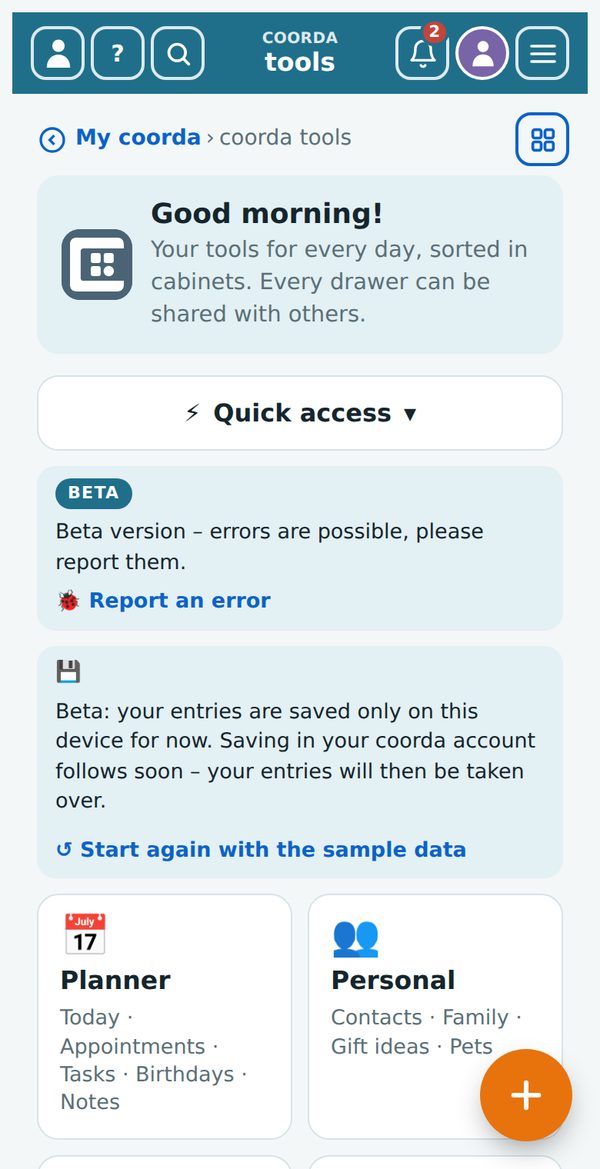
Below the greeting, “⚡ Quick access” opens a list of all drawers – by cabinet or from A to Z. The sign on the right shows what you can use (see 3.12).
3.3 The path below the header
Below the header you always see where you are, for example: Overview › Planner › Notes. Every part is a link – tapping “Overview” takes you back to the start page, tapping “Planner” to the cabinet.
At the far right of this row sits the ⊞ All drawers button. From any page it opens all drawers as tiles, grouped by cabinet – a tap opens the drawer. At the top is “🏠 Overview”; the drawer you are in has a blue frame.
3.4 Switching drawers
Inside a cabinet you see the tabs of its drawers at the top. Tap a tab to open that drawer.
3.5 New entry – the orange “+” button
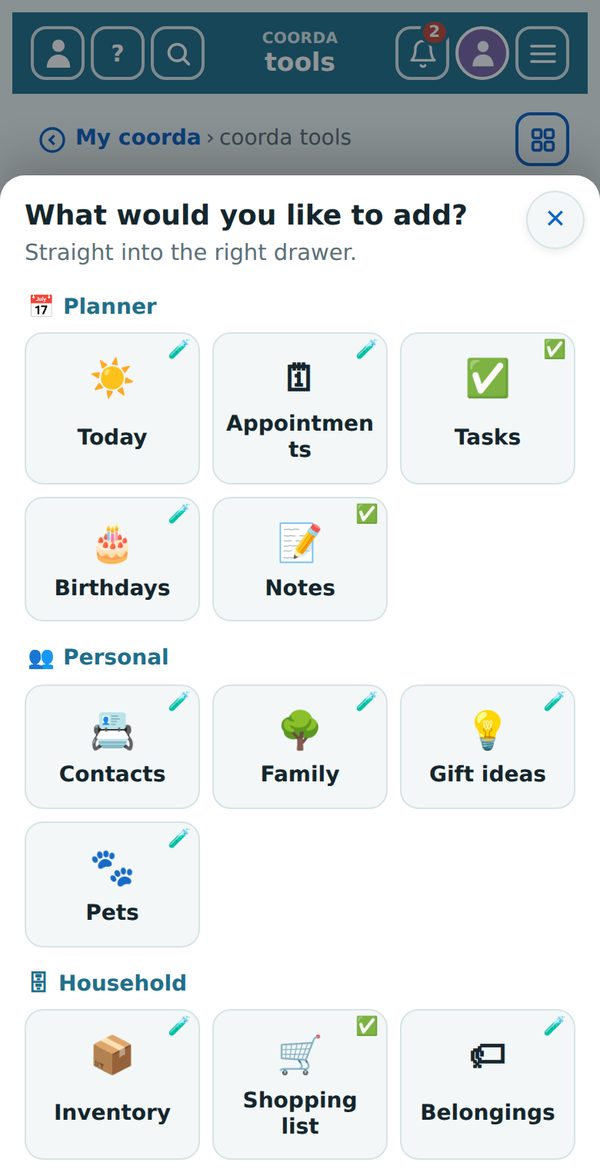
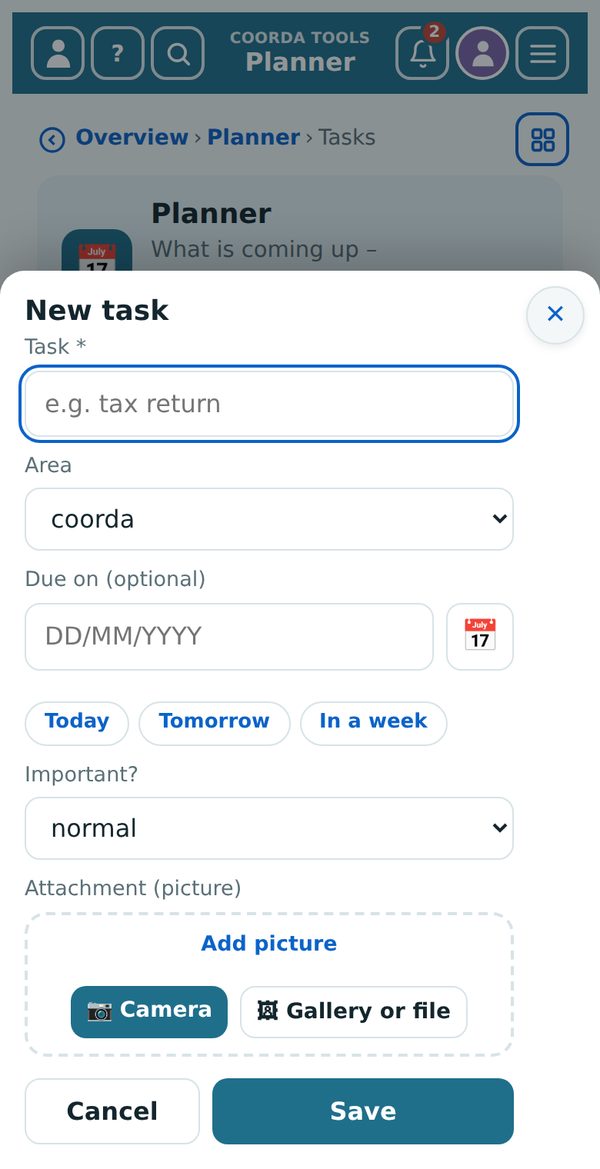
At the bottom right of every page sits the big orange + button. In a drawer it opens the form for a new entry there. On the overview and in “Today” it shows all drawers as tiles, grouped by cabinet: a tap opens the drawer and straight away the form for the new entry.
3.6 Editing and deleting
- Tap an entry or ✎ to edit it.
- Almost everywhere, a tap on a row opens the entry – in “Today”, for birthdays, trips, bookings, in the service book and in the pet diary.
- At the bottom of every edit form you find “🗑 Delete entry”. You are asked once more before anything is really deleted.
- Deleted entries stay in the bin for 30 days, after that they are gone for good.
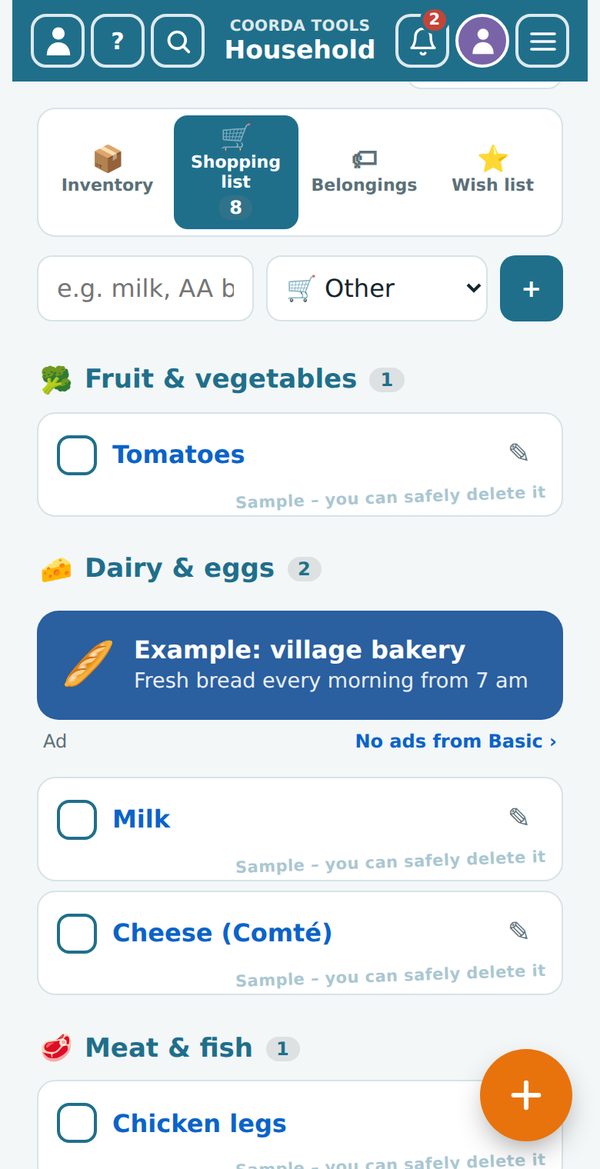
- Entries marked “Sample – you can safely delete it” are examples. They show what a drawer looks like and may be deleted.
3.7 Closing windows
Every window has an ✕ at the top right. On a phone the back button also closes the window.
3.8 Sharing – drawer by drawer
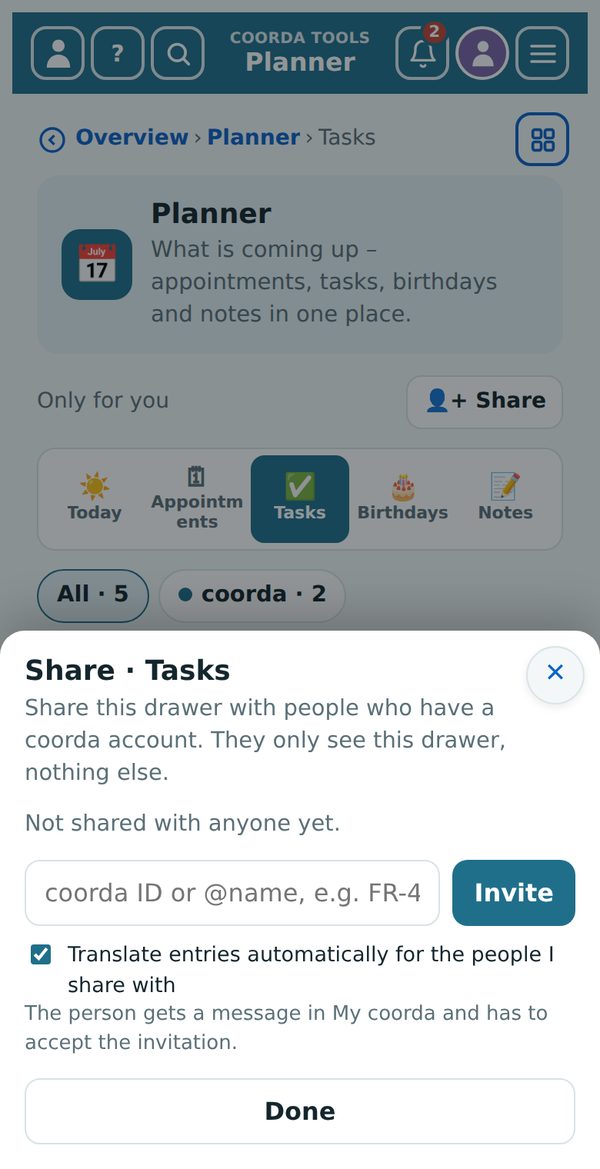
Right under the title of every cabinet it says whether the drawer is “Only for you” or who it is shared with, and next to it is the “👤+ Share” button.
- Tap “👤+ Share”.
- Enter the person’s coorda ID, @name or e-mail address and tap “Invite”.
- If you like, tick “translate entries automatically” – the other person then sees everything in their language. The person gets a message in My coorda and has to accept the invitation.
The person only sees that one drawer. You can end a share at any time. Shared entries can be translated automatically into the other person’s language. The encrypted cabinet cannot be shared.
3.9 Searching
The magnifier 🔍 in the header searches all drawers at once – for example for “Maria”, “olive oil” or “passport”. The encrypted cabinet is not searched.
3.10 Language, appearance and colour
In the menu ☰ you choose the language (8 languages), light, dark or automatic, and the colour theme.
3.11 More arrows
The blue arrow in a circle always leads to more information, for example from the weather to the forecast, or in “Today” to the entry in its drawer.
3.12 The signs on the tiles
In quick access and on the tiles of “+” and “⊞”, a small sign shows what you can use in your plan:
| Sign | Meaning |
|---|---|
| ✅ | allowed |
| 🧪 | allowed in the test phase |
| 📊 | limited use (quota) – e.g. a number of translations per month or storage space |
| 🔒 | encrypted – test phase |
| ⛔ | not included in your plan |
3.13 Entering dates
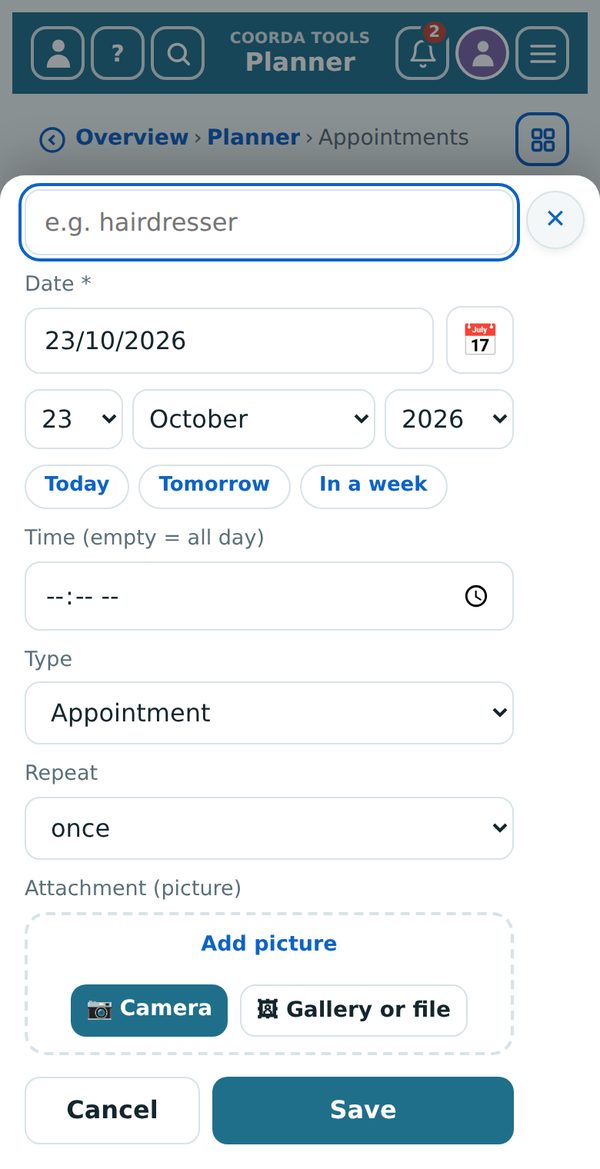
Date fields are plain text fields: type the date as DD/MM/YYYY. 3/4/1950, 03.04.1950, 03-04-1950 and 1950-04-03 are accepted too – when you leave the field it becomes 03/04/1950. An invalid date (for example 31 February) is marked red and not saved.
- 📅 next to the field opens the choice from three lists: day · month · year. That way you reach early years quickly too. For birth, death and birthday the years go back to 1850; a date in the future is not possible there.
- Today · Tomorrow · In a week: for appointments, tasks and other short-term dates these three buttons set the date with one tap.
4. The cabinets in detail
For each drawer you will find what it does, how to use it and which tips are worth knowing. (free) means: included in the free account. (Plus) means: with coorda Plus.
4.1 📅 Planner
What’s coming up – appointments, tasks, birthdays and notes in one place.
Today (Plus) – your daily overview. “Today” collects from all drawers what is due today and this week: appointments, tasks, birthdays with your gift idea, trips, tickets, expiring contracts and ID documents, your pets’ appointments, warranties and vehicle services. The blue arrow in a circle leads to the entry in its drawer.
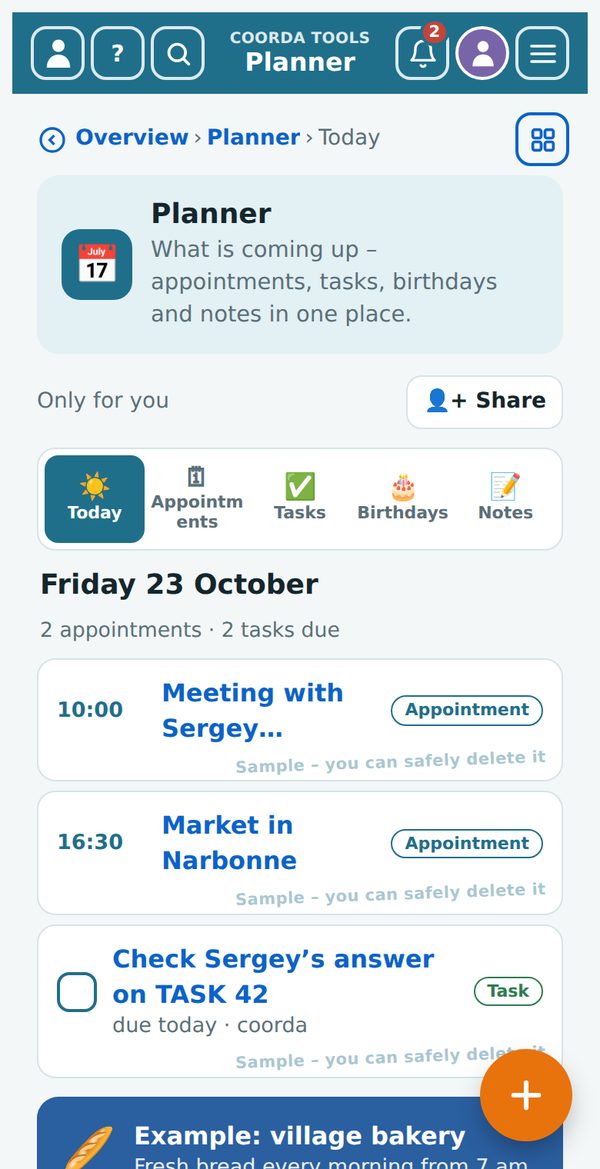
Appointments (Plus) – appointments and events for the next 30 days, the same on phone and computer.
- Tap “+ New appointment”.
- Enter title, date, time and, if you like, place and reminder.
- Save.
Tasks with a date appear here as well.
Tasks (free) – tasks with an area and a due date. Tap the circle in front of a task to tick it off. Completed tasks are under “▸ Done”.
Birthdays (Plus) – you don’t enter anything here: birthdays come by themselves from Family and Contacts. That way every date exists only once. If a gift idea is noted, “Today” reminds you in good time. Deceased relatives appear under 🕯️ Days of remembrance with the day of their death, if it was less than 30 years ago – with the same reminder choice; “no reminder” hides the day of remembrance in “Today”. A tap on a row opens the person: from Family with all details, from Contacts with the card open.
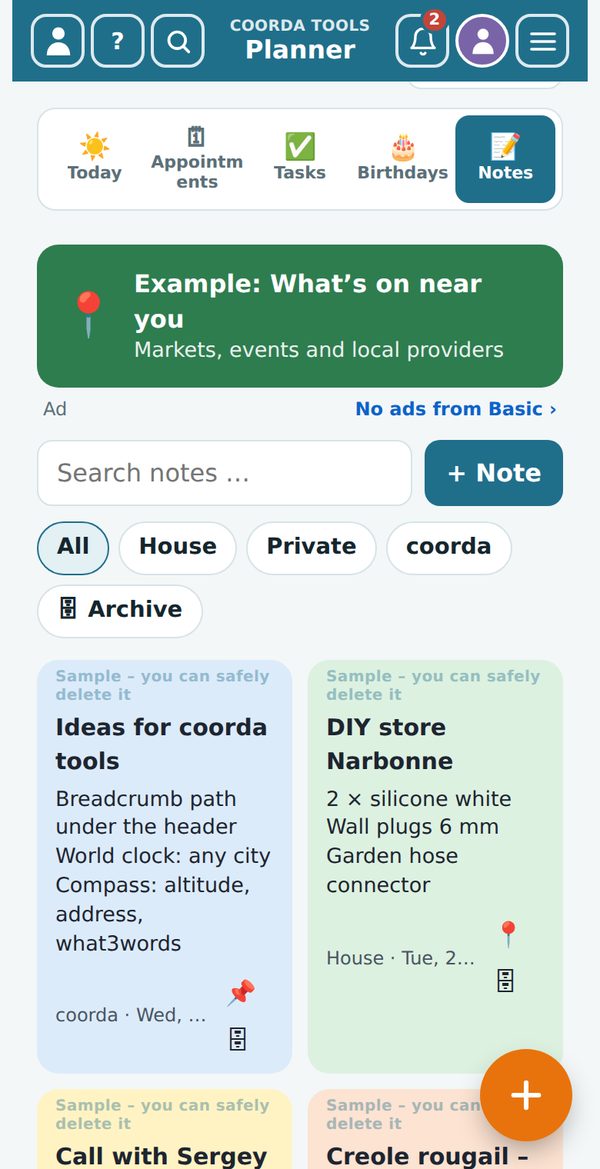
Notes (free) – your notes, organised by project.
- “+ Note” creates a new note; choose project and colour.
- 📌 pins a note to the top, the archive takes the finished ones.
- The search field finds any note, the project pills filter.
- Share the whole drawer with “👤+ Share”.
4.2 👥 Personal
Address book, family, gift ideas and pets.
Contacts (Plus) – your address book. Contacts with 🔗 are linked to a coorda ID: name and address then update by themselves. You only see the phone number if the person shares it with you.
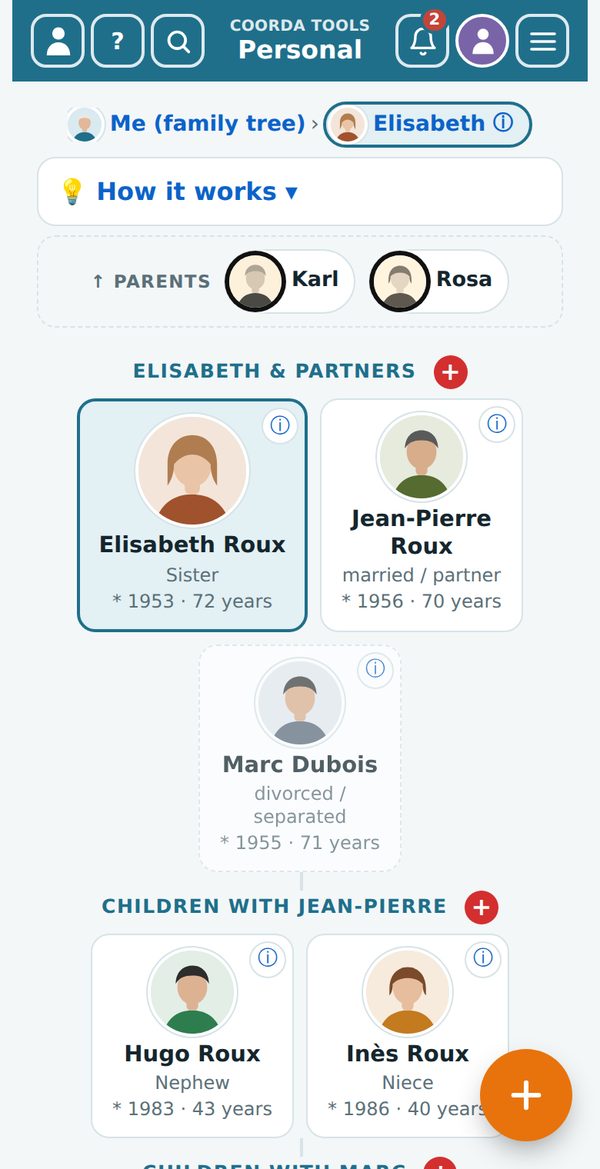
Family (Plus) – your relatives with names, addresses, dates of birth and pictures. At the top you choose “🌳 Relatives”, “☰ List” or “📷 Family photos”.
- Relatives: you always see one family at a time – the person in the middle (blue frame) with their partners, the children below, the parents small at the top. Tap a person and they move into the middle. The row at the top (Me › …) shows your way back; “💡 How it works” explains it all briefly.
- Red +: on every level you add a parent, partner, child or pet directly – the link is set automatically.
- Relationship: choose it from the list, always from your point of view (married, divorced, father, mother-in-law, stepchild …). In the choice lists, each name is followed by the relationship and year of birth – so you never mix up people with the same name.
- Details: place of birth and death, burial place, full address, free remarks and several pictures (☒ = avatar). ⓘ on a card shows everything at a glance.
- Deceased relatives get a black ring and – if less than 30 years ago – a day of remembrance in the Planner.
- “🗑 Clear relatives” at the bottom removes everyone except you.
Family members with a coorda account link themselves and decide which of their details you see.
Gift ideas (Plus) – ideas per person, visible only to you. Tap the status to move it on: idea → bought → given.
Pets (Plus) – your pets with vet, care, food and diary. Recurring care (vaccination, deworming, claws) you tick off with “Done”; the next date is calculated. In the diary you record vet visits, purchases and special moments: “+ Entry” with date, costs and photo; a tap on an entry opens it to edit or delete.
4.3 🏠 Household
Inventory, shopping list, belongings and wish list – what runs low goes onto the list.
Inventory (Plus) – count supplies and organise collections (CDs or records, for example). Supplies have a quantity and a minimum. Count along with − and +. If a supply drops below its minimum, it goes onto the shopping list.
Shopping list (free) – sorted by groups (fruit & vegetables, meat, dairy …) in the order of your shop. Tick items off in the shop; whoever shares the list with you sees it at once.
Belongings (Plus) – devices and products with serial number, purchase date, price, photo and warranty. The end of the warranty appears in “Today” 30 days ahead. Keep the invoice and manual in Files. For your insurance, the list with purchase values can be printed as an overview.
Wish list (Plus) – what you would like to have. Share the list, for example before your birthday: others can reserve wishes, you don’t see the reservations – the surprise stays a surprise. “Bought” moves the item into Belongings.
4.4 🍳 Kitchen & Garden
Your own recipes, garden and plants.
Recipes (Plus) – your own recipes with photo. The form has two separate parts:
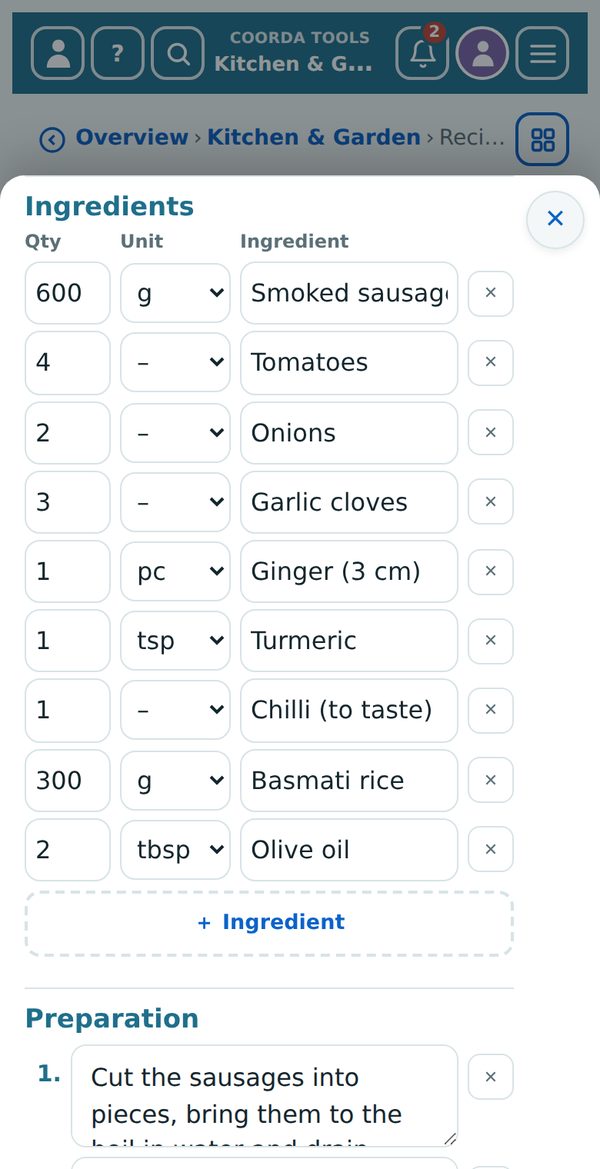
- Ingredients: one row per ingredient with quantity · unit · ingredient. You choose the unit from the list (g, kg, ml, l, tbsp, tsp, piece, pinch, bunch, cup, tub). “+ Ingredient” adds a row, Enter jumps to the next.
- Preparation: each step in its own numbered field; “+ Step” adds another.
- Missing ingredients: in the recipe every ingredient has a tick box. Pre-ticked is whatever is neither in the inventory nor on the shopping list. The button “🛒 Put … ticked ingredients on the shopping list” takes exactly those – matching the number of servings chosen.
While cooking, the converter helps (cup, tbsp, tsp).
Garden (Plus) – beds, jobs throughout the year and harvest. The jobs follow the month and the climate. “→ Task” turns a job into a task in the Planner.
Plant list (Plus) – your plants with location, care and watering plan. “Watered” resets the counter; plants that are due can appear as a reminder in the Planner.
4.5 🚗 Vehicles
Car, motorbike, bicycle – with service and inspection dates.
My vehicles (Plus) – all the details of your vehicles in one place: number plate, model, drive, mileage, insurance. Keep papers such as the registration document and insurance card in Files – on the road they are one tap away. At a police check, however, the original still counts.
Service & dates (Plus) – the service book: maintenance, tyre change, roadworthiness test (Contrôle technique / MOT). “+ Entry in the service book” records what was done. Upcoming dates appear in “Today” 30 days ahead. Garages come from Contacts, invoices from Files. A tap on an upcoming date opens the vehicle with all its details.
4.6 ✈️ Leisure & Travel
Trips with all bookings, destinations, packing lists and tickets.
Trips (Plus) – every trip as a timeline: flight, accommodation, rental car, train and admissions, with booking code, confirmation as PDF and reminders (online check-in, cancellation deadline). At the top you choose “Upcoming” or “Past”. Share a trip with your fellow travellers. It also checks whether your ID document is still valid on the travel date.
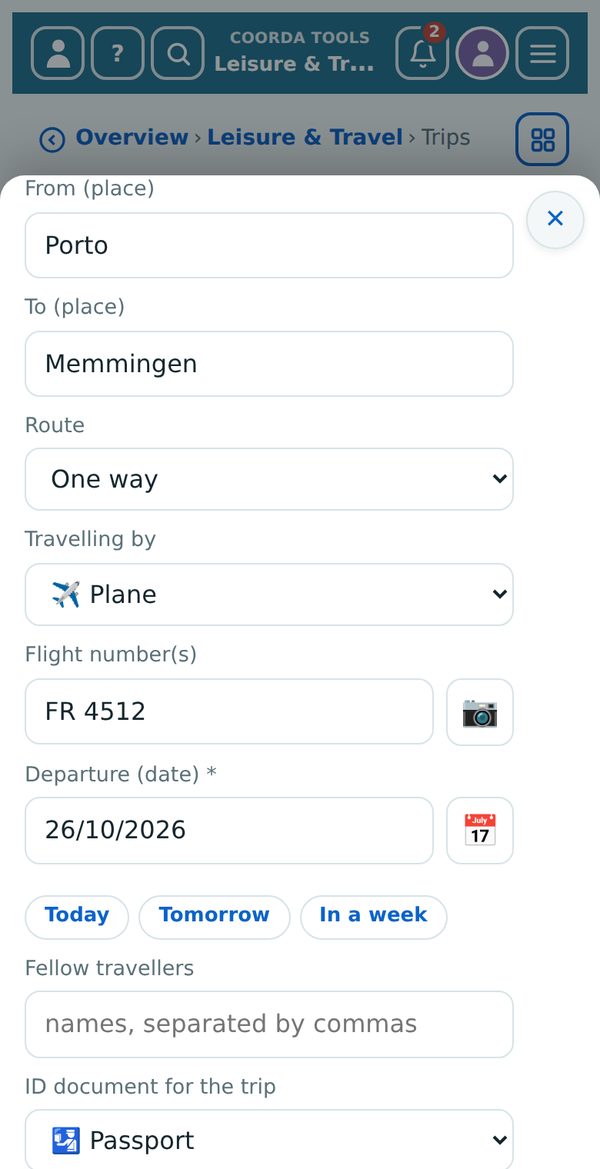
- New trip: name, From (place) and To (place), then the route: “Return trip”, “Return trip (to another place)” with “Back to (place)” or “One way”. Plus Travelling by (plane, car, train, bus, boat, camper van), Departure and – except for “One way” – Return.
- Flight number(s): only appears for “Plane”. 📷 next to it scans the ticket; coorda AI reads flight number, date and route.
- Comment: room for everything else; in the trip it appears as a 💬 box.
- In the list it reads, for example, “✈️ Porto → Memmingen (FR 4512) · 26 Oct 2026”. A tap on the header card of a trip opens it for editing; a tap on a booking opens the booking.
Destinations (Plus) – places you would like to see one day. One tap turns one into a trip. Places you have visited stay as a memory, with the date. A tap on a tile opens the related trip – if there is none yet, the destination for editing.
Packing list (free) – templates to tick off, for example “Road trip” or “Beach”. After the trip tap “Reset all” – next time the list is complete again. There are templates for air travel, weekend, beach, road trip and 🌴 annual holiday.
Tickets (Plus) – concert, theatre, museum, sport, flight, bus and train, with seat and ticket. Add the image as a photo, a screenshot or from Files. Tap the image to show the QR code large and bright – for scanning at the entrance, even without a network.
4.7 🧰 Useful
Calculator, converter, translator, location, files, and contracts and subscriptions. The weather is here too.
Calculator (free) – calculator and simple tables with formulas. Tap a result in the history to keep calculating with it. On a computer the keyboard works too.
Converter (free) – inch/cm, °F/°C, miles/km, gallons/litres, cooking measures and more. Example: a 55-inch TV measures 139.7 cm. A tap on a result copies the value, for example to paste it into a message.
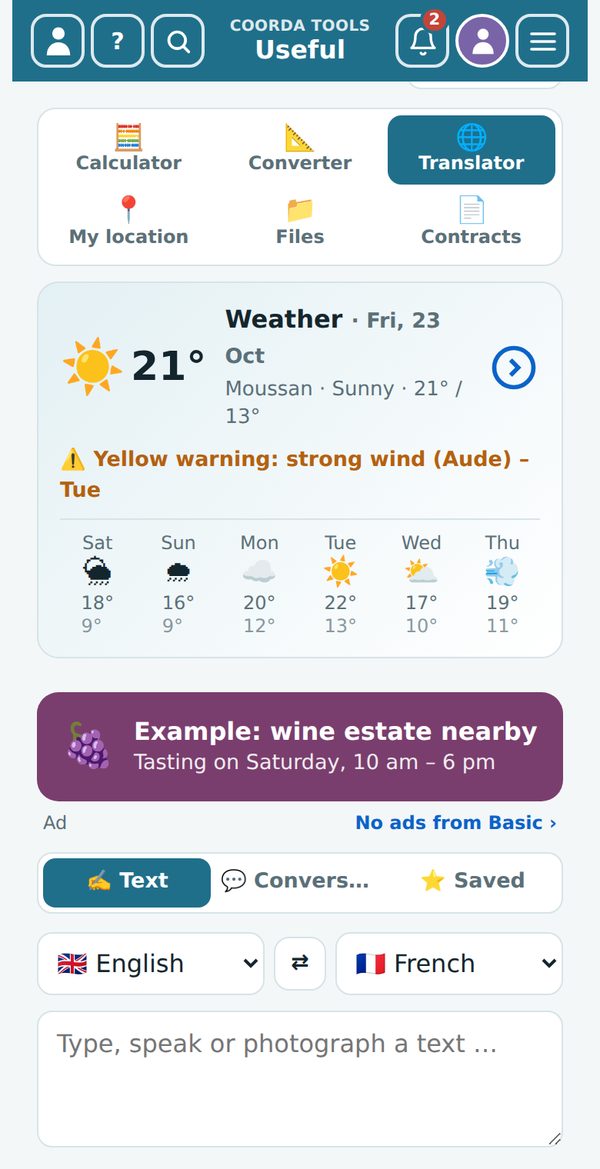
Translator (free) – translate text, speech and photos (menus, signs, forms) with coorda AI.
- “✍️ Text”: enter text, choose the languages, “Translate”.
- “💬 Conversation”: speak in turns – handy when talking to someone abroad.
- “⭐ Saved”: your saved sentences.
Up to 2000 characters per text and 50 translations a day, not counted against your coorda AI questions. The history stays with you only.
My location (free) – all the GPS data of your device: address, coordinates, altitude, accuracy, Plus Code. Nothing is stored unless you tap “Save place”. Handy: save where you parked the car and find your way back later with “➜ Go”, or share your position in an emergency. The altitude from phone GPS is often 10–30 m off.
Files (Plus) – store documents and photos and find them again quickly. Files can be attached to entries in other drawers: an invoice to a device in Belongings, the registration document to a vehicle, a photo to a garden bed.
Contracts (Plus) – insurance, phone, electricity, rent, bank, memberships, subscriptions – or a contract type of your own. The last day to cancel is calculated from the term and notice period; “Today” reminds you 30 days ahead. “✉ Prepare cancellation” writes the cancellation letter.
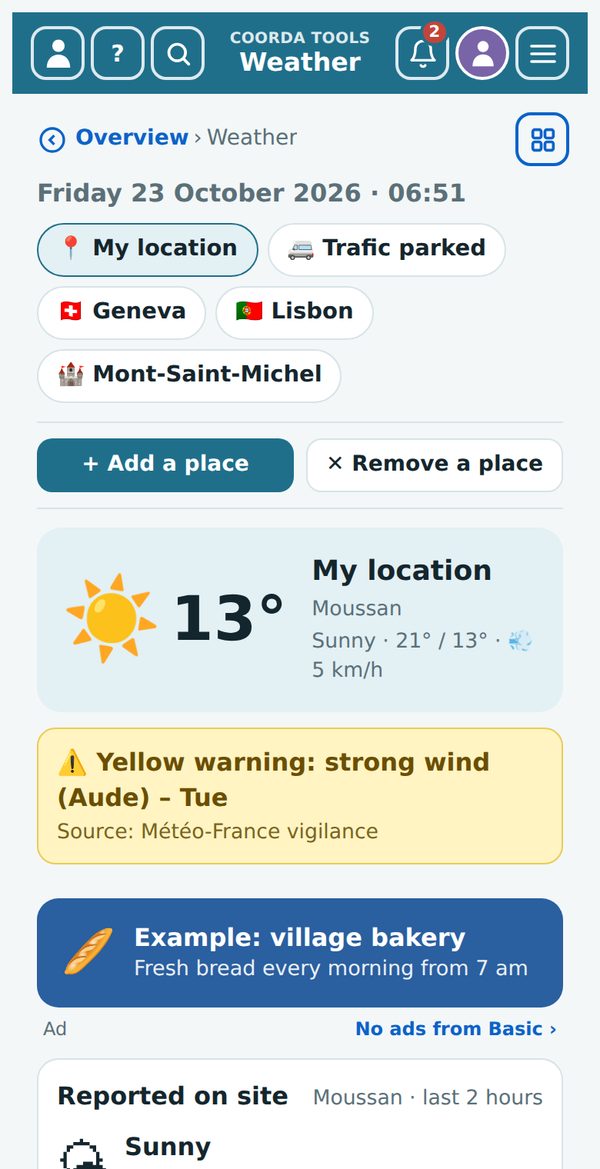
Weather – the large weather tile below the cabinets and in “Useful”: current weather and forecast for your location and your own places, with severe-weather warnings. With an account you can report what the weather is like where you are right now (from bright sunshine to storm, with temperature) – everyone looking at that place sees your report.
4.8 🛟 Everyday helpers
Clock, timer, alarm and world clock, voice recorder, video, scanner, torch, magnifier, compass and more.
Clock (free) – at the top choose Clock, Timer, Stopwatch, Alarm or World. In the world clock you can add any city in the world; the time zone is chosen automatically. The “🌙 Bedside clock” keeps the screen on with a dark display – tap to close it.
Voice recorder (Plus) – record, play back and have coorda AI turn it into text with “✍️ Transcribe”. “📝 → Note” turns it into a note. Recordings count towards your storage.
Video (Plus) – short videos up to 3 minutes with date, time and, if you like, GPS location, for example as evidence of damage or at a handover. Start “📷 Camera”, then the red record button.
Scanner (free) – “QR & barcode”: scan barcodes of supplies straight into the inventory or onto the shopping list; QR codes open links, Wi-Fi details or tickets. “Document”: photograph pages and save them as a PDF.
Light & magnifier (free) – a torch using the camera light (on Android in Chrome) or the white screen as a light (on iPhone too); the magnifier enlarges through the camera.
Compass & more (free)
- Compass: “Start compass”, hold the phone flat. Below it you see place, GPS coordinates, altitude and – where available – the 3-word address.
- Level: “Start level”, lay the phone flat on the surface – the bubble in the middle means level. On an iPhone the browser asks once for permission.
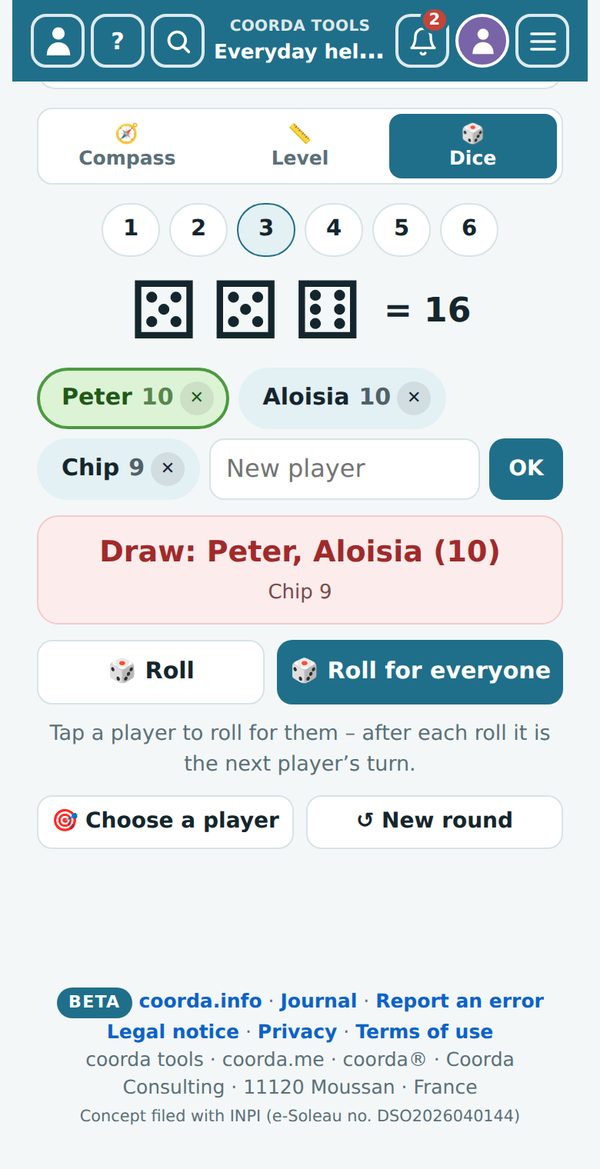
- Dice: choose the number of dice (1–6). Add players with a name and “OK”; ✕ removes one. Tap a player (green), then “Roll” rolls for them – after that it is automatically the next player’s turn. “Roll for everyone” rolls for all at once. The red box shows the highest score, the others below it. “Choose a player” picks a name at random (who’s cooking tonight?), “↺ New round” resets all totals.
5. 🔐 The encrypted cabinet
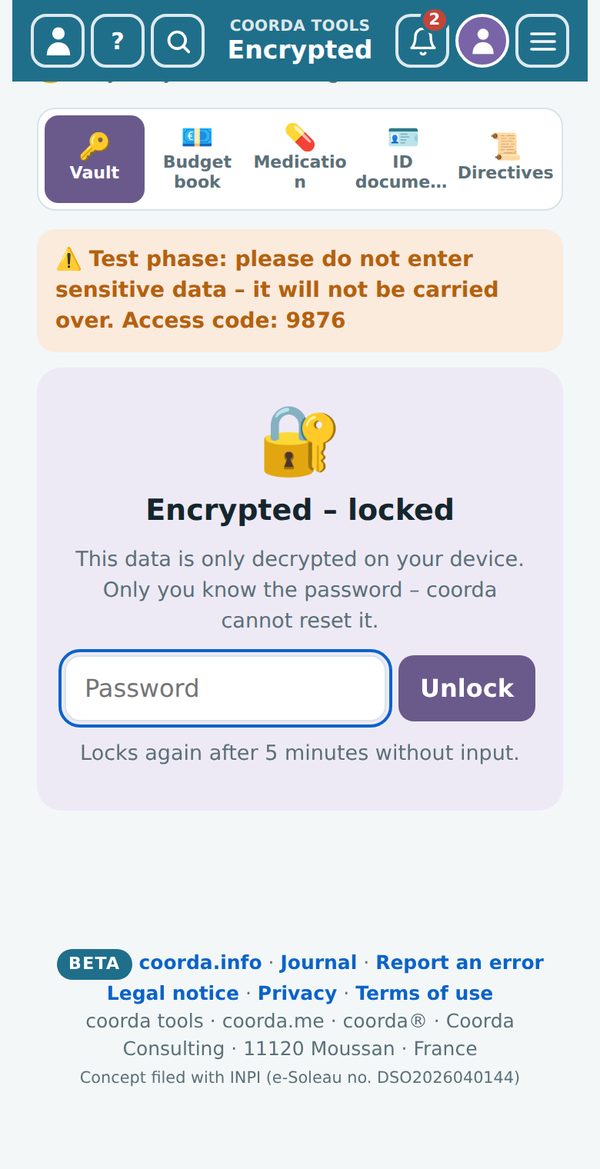
End-to-end encrypted: this data is only encrypted and decrypted on your device. Not even coorda can read it.
5.1 The drawers
- Vault – passwords and logins.
- Budget book – income, expenses and account balances, without any connection to your bank.
- Medication – medicines and intake schedule.
- ID documents – passport, identity card, driving licence, insurance cards, with a reminder before they expire. Trips check whether the chosen ID is still valid on the travel date.
- Directives – will, advance healthcare directive, lasting power of attorney: what exists, where the original is, whom to ask.
5.2 Unlocking
- Open the “Encrypted” cabinet.
- Enter your password for the cabinet and tap “Unlock”.
- After 5 minutes without input the cabinet locks itself again. “🔒” locks it immediately.
5.3 Good to know
- Only you know the password. coorda cannot reset it. If you forget it, the data in the cabinet is lost. Keep the password in a safe place.
- Three wrong passwords lock the cabinet for one hour. The app shows until when.
- The encrypted cabinet is not shared and not searched, and there is no advertising here.
Test phase: the encrypted cabinet is currently in its test phase. Please don’t enter any sensitive data yet – entries from the test phase will not be carried over.
6. Plans, advertising and privacy
6.1 What it costs
| Plan | Includes | Price |
|---|---|---|
| Without an account | almost all tools for 14 days on this device, coorda AI 3 questions a day, with ad banners | €0 |
| Free account | tasks, notes, shopping list, calculator, converter, translator, location, weather and clock on all devices, coorda AI 3 questions a day, with ad banners | €0 |
| coorda Plus | all tools, 1 GB storage, 150 questions to coorda AI a month, for all coorda services, with ad banners | €29 a year plus VAT |
| Basic · Boost · Pro | everything in coorda Plus, without advertising, plus your own offers in all coorda services | see the price list on coorda.me |
Launch offer: with the free account all tools can be used without limits, and every new account gets 1 month of coorda Plus as a gift. You see and change your plan in “My coorda”.
6.2 Advertising
In trial mode, in the free account and in coorda Plus we show banners from coorda partners and local businesses: in longer lists after the 3rd entry and then after every further 6 entries. They are chosen by location, never by your entries, without tracking, never in the encrypted cabinet and never as a pop-up. From Basic upwards the tools are ad-free.
6.3 Privacy in brief
- Your data is stored on servers in the EU (Germany).
- We don’t sell data and don’t build advertising profiles.
- We only use your location if you allow it and a feature needs it.
- You can export your data at any time and close your account in “My coorda”.
In full: coorda.me/privacy (privacy policy) and coorda.me/terms (terms of use), both in 8 languages and as PDF. The links are also at the bottom of every page.
7. Frequently asked questions and help
Do I need an app? No. coorda tools run in the browser. On your phone you can add them to the home screen like an app (see 2.1).
Where are my entries stored in the beta? For now only on your device, in this browser. Saving in your coorda account follows soon – your entries will then be taken over. “↺ Start again with the sample data” in the beta note on the overview deletes all entries on this device and starts again with the examples.
What happens to my trial entries when I sign up? They are taken over into your account and appear on all your devices.
Can I back up my data? Yes. In “My coorda” you can export your data at any time. During the beta phase we recommend that you also keep your own copy of important data.
I deleted something – is it gone? Deleted entries stay in the bin for 30 days.
Why don’t the compass or level work? They need the phone’s motion sensors. On an iPhone the browser asks once for permission – if it was refused, close the tab, open the page again and tap “Allow”. Computers have no such sensors.
Why doesn’t the torch work on my iPhone? The iPhone’s browser does not allow the camera light. Use “💡 Screen as light”.
Can I use coorda tools for my business? Yes. Tools of their own for companies and associations are offered by coorda.com.
I found a bug. In the menu ☰ → “🐞 Report an error”: briefly describe what happened, if you like with your e-mail address for a reply.
Contact Questions, ideas or a problem? Write to us via the contact form on coorda.me/tools or to coorda.eu@pm.me – we reply in your language.
Last updated: 23 October 2026 · coorda tools beta
coorda tools · coorda.me · coorda®\ Coorda Consulting · Peter Sulser\ 2 Lot Gélis · 11120 Moussan · France\ E-mail: coorda.eu@pm.me\ Phone: +33 6 99 90 98 24
Legal notice · Privacy · Terms of use · coorda.info
coorda® is a registered trademark (INPI). Concept registered with INPI (e-Soleau no. DSO2026040144).